or
1 answer
17 views
Would like to check if this chart is possible using kendo chart
Normal scenario where there is score difference between current and previous year
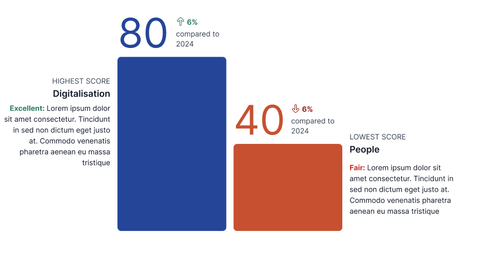
Scenario if multiple domains score the same for highest/ lowest score
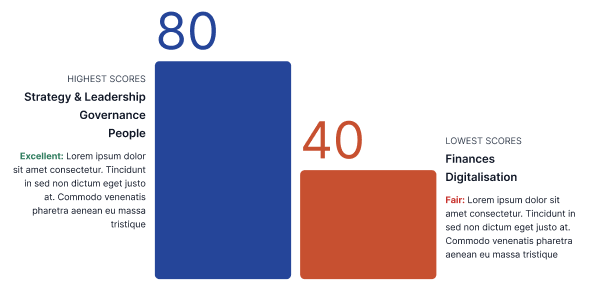
Scenario if there is no change compared to the previous report 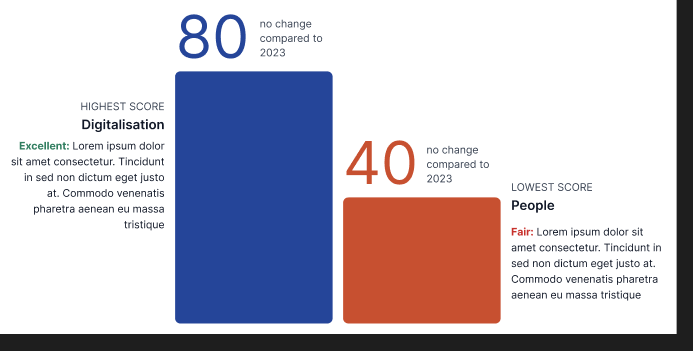
Scenario if all domains score the same for highest/ lowest score

Mobile display


Eyup
Telerik team

answered
on
24 Mar 2026
2 answers
35 views
Hi, please see the file view icons demoed on this page: https://demos.telerik.com/kendo-ui/filemanager/index
Clicking on 'Grid View' displays the FIle List view and vice versa, which is what we are seeing when implemented also.
The screenshot of the control seems to display the action of the icons correctly: https://www.telerik.com/kendo-jquery-ui/documentation/controls/filemanager/overview

Viktor Tachev
Telerik team
answered
on
20 Mar 2026
1 answer
23 views
this image below is the expected outcome
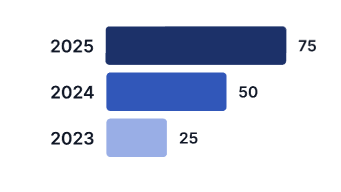
dojo link of what i have done
chart will load upon clicking on the various buttons



1 answer
18 views
Hello all,
I’m working on an inline editable Kendo Grid and trying to add a dropdown list for one of the columns. However, when I run it, the dropdown doesn’t load properly. Instead of showing the item names, the textbox displays [object Object].
I’m using Kendo version 2025.3.825, and my code must comply with CSP rules.
Could someone guide me on how to fix this so the dropdown shows the correct text values instead of the object?
ASP.NET MVC Grid Custom Editing Demo | Telerik UI for ASP.NET MVC
Viktor Tachev
Telerik team
answered
on
18 Mar 2026
2 answers
36 views
I am trying to use https://www.telerik.com/download/custom-download (Custom downloader) for jQueryUI for the latest version 2026.1.212 but none of the checkboxes are appearing or the download button.
Anyone else experiencing this?

Patrick | Technical Support Engineer, Senior
Telerik team
answered
on
17 Mar 2026
1 answer
25 views
I am using the kendo treeview and need to display a count of the children on the node. How would I do this? I've tried the other solutions such as item.children.view() and item.children.data() but those always return 0. I've also set loadOnDemand to false which has no effect.
Viktor Tachev
Telerik team
answered
on
13 Mar 2026
1 answer
31 views
Append not showing tab content and throws when you try to select by index. Version 2024.3.1015
<div class="row" id="managing-directors-tab-strip"></div>
            const tabStrip = $("#managing-directors-tab-strip", container).kendoTabStrip({
                animation: false
            }).data("kendoTabStrip");

            tabStrip.append({ text: "Tab 1", content: "<text>111</text>" });
            tabStrip.select(index);
Uncaught TypeError: Cannot read properties of undefined (reading 'id')
at init.contentElement (kendo.tabstrip.js:621:71)
at init.contentHolder (kendo.tabstrip.js:631:41)
at init._click (kendo.tabstrip.js:984:38)
at init._itemClick (kendo.tabstrip.js:1208:22)
at HTMLUListElement.dispatch (event.js:335:27)
at elemData.handle (event.js:139:28)
1 answer
26 views
Hi,
I am currently trying to upgrade to Kendo UI JQuery v2026.1.212 and have noticed changes related to the way messages are posted to the chat. In previous versions (v2025.2.702) I could do the following:
function getChatUser(){
 return {
     id: kendo.guid(),
     name: "Admin",
     iconUrl: "/Images/chatIcon.svg"
 };
}

 function postMessages(){
 const myChat = $("#chat").data("kendoChat");

 const myCustomTemplate = kendo.template($("#custom-template").html());
 kendo.chat.registerTemplate("custom", myCustomTemplate);

 const MD_MESSAGE = kendo.template("<div class='k-message'><div class='k-bubble fw-chat-bubble'>#= DOMPurify.sanitize(marked.parse(text)) #</div></div>");
 kendo.chat.registerTemplate("md_message", MD_MESSAGE);

myChat.renderMessage({
    type: "md_message",
    text: "**Hello** this is a text *markdown* message"
}, getChatUser());

 myChat.renderMessage({
     type: "custom",
     html: `<img src="/Images/chatIcon2.svg" width="400" height="350" alt="" />`
 }, getChatUser());

 }
How do I post messages to the chat referencing a template with v2026.1.212?
Thanks,
Euan

Nikolay
Telerik team
answered
on
27 Feb 2026
1 answer
75 views
would like to check if the following chart layout is possbile for Kendo Bar chart?
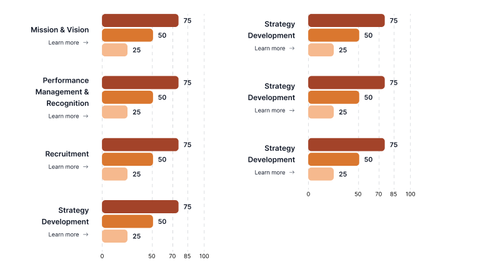
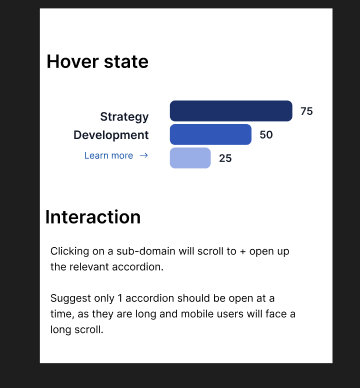
and also i would like to have an onHover event that will change the chart color. for example if i hover on the category or chart for Strategy Development to change its color to like this

Neli
Telerik team
answered
on
26 Feb 2026
6 answers
3.6K+ views
Suppose I've got an array of items, and I'd like to edit an attribute of each of those items. So I create a div, bind my array of items to it, and then specify a template to use to render each item using the data-bind attribute to bind the value of my item an input box.
e.g. (this is derived from another example I found in a separate thread),
<div id="example" data-template="template" data-bind="source: arr"></div>
<script id="template" type="text/x-kendo-template">
<div> Age: ${age}</div>
<input type="text" data-bind="value: age"/>
</script>
and
var arr = new kendo.data.ObservableArray([
{ name: "John Doe", age: 23 },
{ name: "Jane Doe", age: 34 }
]);
var viewModel = kendo.observable({
arr: arr
});
kendo.bind($("#example"), viewModel);
setTimeout(function() {
viewModel.arr[1].set('age',54);
}, 2000);
From this example, I'd expect to see the first div and text box with values of 23, and the second div and text box with values of 34. Instead I get the first div with 23 and the first text box with 34, and the second div with 34 and the second text box empty. Then when the function specified in setTimeout runs, it changes the value in the first text box, instead of the second one.
Here's a JSFiddle where you can try it: http://jsfiddle.net/2R3tF/
Seems simple to me, but I must not be understanding the plumbing enough to figure out why this doesn't work. Can someone explain, and ideally provide a version that works?
e.g. (this is derived from another example I found in a separate thread),
<div id="example" data-template="template" data-bind="source: arr"></div>
<script id="template" type="text/x-kendo-template">
<div> Age: ${age}</div>
<input type="text" data-bind="value: age"/>
</script>
and
var arr = new kendo.data.ObservableArray([
{ name: "John Doe", age: 23 },
{ name: "Jane Doe", age: 34 }
]);
var viewModel = kendo.observable({
arr: arr
});
kendo.bind($("#example"), viewModel);
setTimeout(function() {
viewModel.arr[1].set('age',54);
}, 2000);
From this example, I'd expect to see the first div and text box with values of 23, and the second div and text box with values of 34. Instead I get the first div with 23 and the first text box with 34, and the second div with 34 and the second text box empty. Then when the function specified in setTimeout runs, it changes the value in the first text box, instead of the second one.
Here's a JSFiddle where you can try it: http://jsfiddle.net/2R3tF/
Seems simple to me, but I must not be understanding the plumbing enough to figure out why this doesn't work. Can someone explain, and ideally provide a version that works?
 (4).jpg)











